Best Budget Webcam for Streaming in 2026: Top Picks for Every Creator
If you’ve been streaming on a potato-quality built-in laptop camera, you already know the problem. Blurry video, washed-out skin tones, and that unmistakable “I’m using my 2015 MacBook” look — it’s not a great first impression for your audience.
The good news? You don’t need to spend $200+ to look professional on stream. The best budget webcams for streaming have come a long way, and in 2026 you can get crisp 1080p video, decent low-light performance, and plug-and-play simplicity for under $80 — sometimes well under.
In this guide, we’ve tested and reviewed seven of the top affordable webcams for streamers, YouTubers, Twitch broadcasters, and content creators who want to upgrade their setup without emptying their wallet. Whether you’re just starting out on Twitch, running a weekly Zoom gaming session, or building a home studio on a tight budget, there’s a solid pick here for you.
Quick Picks: Best Budget Webcams for Streaming at a Glance
| Webcam | Resolution | Price Range | Best For |
|---|---|---|---|
| Logitech C920x | 1080p/30fps | ~$65–$75 | Best overall budget pick |
| Razer Kiyo | 1080p/30fps | ~$70–$80 | Built-in ring light, low-light streaming |
| NexiGo N60 | 1080p/30fps | ~$35–$45 | Ultra-budget beginners |
| AVerMedia PW310P | 1080p/30fps | ~$55–$65 | Streamers on OBS/XSplit |
| Logitech C615 | 1080p/30fps | ~$45–$55 | Travel streamers, compact setup |
| Anker PowerConf C200 | 1080p/30fps | ~$55–$65 | Dual mic, versatile use |
| Microsoft LifeCam HD-3000 | 720p/30fps | ~$25–$35 | Absolute tightest budgets |
Best Budget Webcams for Streaming: Our Top 7 Picks
Logitech C920x Review
Overview
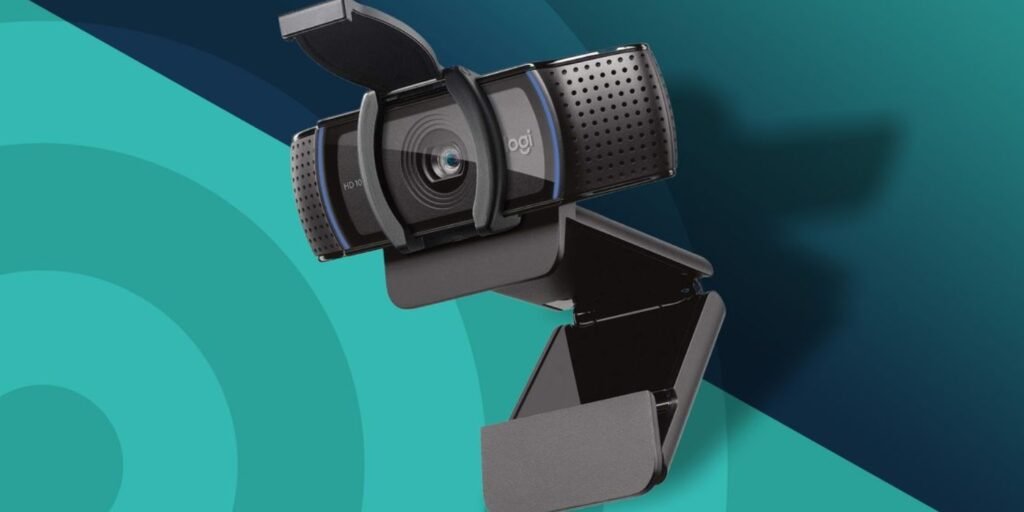
The Logitech C920x has been a community favorite for years, and it’s still earning that reputation in 2026. It’s arguably the most-recommended affordable streaming webcam among content creators, and for good reason — it delivers consistent, reliable 1080p footage with very little fuss.
Key Features
- Full HD 1080p at 30fps (720p at 60fps)
- Dual built-in stereo microphones with noise cancellation
- Auto-focus and automatic light correction
- Compatible with Logitech G HUB software
- Works natively with OBS, Streamlabs, XSplit, Zoom, and Teams
- Foldable clip mount for monitors and laptops
Pros
- Excellent color accuracy out of the box
- Rock-solid plug-and-play compatibility across Windows and macOS
- Stereo microphone is usable as a backup audio source
- Durable build quality that holds up long-term
- Widely available in the US, Canada, and UK
Cons
- 30fps cap at 1080p (not ideal for fast-paced gaming streams)
- Auto-exposure can occasionally blow out in bright scenes
- No built-in ring light or privacy cover (the C920x added the cover vs. the original C920)
Who This Is Best For
The C920x is perfect for streamers who want a dependable, no-nonsense webcam that “just works.” If you’re starting your first Twitch or YouTube channel and want something the community has trusted for years, start here.
Razer Kiyo Review
Overview
The Razer Kiyo takes a clever approach to the low-light streaming problem: instead of relying purely on sensor engineering, it attaches a built-in ring light around the lens. The result is flattering, diffused facial lighting that makes a real difference when your room setup isn’t ideal.
Key Features
- 1080p at 30fps / 720p at 60fps
- Integrated adjustable ring light with 12 brightness levels
- Uncompressed USB video output
- Compatible with all major streaming software
- 360-degree adjustable light temperature
Pros
- Ring light is a genuine game-changer for darker rooms
- Skin tones look natural and well-lit even without studio lighting
- Great plug-and-play experience
- Solid autofocus performance
- Popular choice among Twitch streamers and face-cam setups
Cons
- Ring light adds bulk — it’s not a travel-friendly webcam
- Slightly pricier than the C920x for similar core specs
- Ring light cable management can feel awkward on some monitor setups
Who This Is Best For
The Razer Kiyo is the go-to choice if you stream in a dimly lit room or don’t want to invest in separate ring lights or key lights. It’s also a great pick for IRL streamers setting up in variable lighting environments.
NexiGo N60 Review
Overview
If your budget is tight and you just need something dramatically better than your built-in laptop camera, the NexiGo N60 punches well above its price point. It’s become a popular ultra-affordable webcam recommendation in streaming communities and with good reason.
Key Features
- 1080p at 30fps
- Auto-focus with manual focus ring option
- Built-in noise-canceling microphone
- Privacy cover included
- Universal clip compatible with most monitors and tripods
Pros
- Genuinely impressive image quality for the price
- Privacy cover is a nice touch at this price range
- Works on Windows, Mac, and Chromebook out of the box
- Lightweight and easy to set up
Cons
- Image can look soft or slightly washed out in very bright lighting
- Microphone quality is passable but not great for audio-focused streams
- Build plastic feels budget at times
Who This Is Best For
The NexiGo N60 is the best budget webcam for streaming beginners who are testing the waters without committing a lot of money. It’s an excellent first step up from a laptop camera.
AVerMedia PW310P Review
Overview
AVerMedia is a brand best known among PC gaming and streaming enthusiasts, and the PW310P reflects that DNA. It’s built with streaming software compatibility in mind and performs solidly in the mid-budget space.
Key Features
- 1080p at 30fps
- Fixed focus lens (no autofocus lag)
- CamEngine software with scene filters and virtual backgrounds
- Works with OBS, XSplit, Streamlabs, and Teams
- 90-degree field of view
Pros
- Fixed focus delivers consistently sharp image without hunting
- CamEngine software adds useful creative filters for streamers
- Wider field of view than many competitors at this price
- Good daytime image quality
Cons
- Fixed focus can be an issue for very close-up setups
- Low-light performance is average
- CamEngine software can feel bloated for simple use cases
Who This Is Best For
The AVerMedia PW310P suits streamers who want reliable sharpness, wider frame coverage for showing off their whole desk setup, and who appreciate having dedicated streaming software built in.
Logitech C615 Review
Overview
The C615 is Logitech’s compact, travel-friendly 1080p webcam. It’s been around for a while but remains a smart pick for streamers who need portability alongside decent image quality.
Key Features
- 1080p at 30fps
- Foldable, portable design with built-in cable storage
- 360-degree pan and tilt
- Autofocus
- Built-in microphone
Pros
- Extremely portable — great for streaming on the go or at LAN events
- Solid build quality with hinged design
- Autofocus performs reliably in typical indoor lighting
- Decent price point
Cons
- Image quality is slightly behind the C920x at the same distance
- Microphone is mono, not stereo
- Not the best low-light performer in the lineup
Who This Is Best For
The C615 is the top pick for streamers who travel frequently or set up in multiple locations. If you go to gaming events, stream from a hotel room, or constantly move your setup, the portability here is unmatched at this price.
Anker PowerConf C200 Review
Overview
Anker is mostly known for charging accessories, but the PowerConf C200 is a legitimate contender in the affordable webcam market. It leads with dual microphones and versatile mounting options, making it a well-rounded pick.
Key Features
- 2K (2560×1440) resolution option at 30fps / 1080p at 60fps
- Dual built-in AI-enhanced microphones
- Auto-exposure and auto-white balance
- Privacy cover included
- AI-powered noise cancellation
Pros
- 2K resolution option offers sharper image than most competitors at this price
- Dual microphone setup provides surprisingly good audio quality
- 1080p/60fps option is great for fast-paced gaming streams
- Includes a privacy cover
Cons
- 2K mode only available at 30fps
- AI noise cancellation can occasionally over-process voice
- Software is basic compared to Logitech or AVerMedia equivalents
Who This Is Best For
The Anker C200 is ideal for streamers who also do a lot of video calls and want one device that excels at both. The dual mics and 2K option make it a strong all-rounder that punches above its price.
Microsoft LifeCam HD-3000 Review
Overview
At the most affordable end of the spectrum, the Microsoft LifeCam HD-3000 is a 720p webcam that still manages to be a significant upgrade over most laptop-integrated cameras. It’s the right pick when your budget is absolutely minimal.
Key Features
- 720p at 30fps
- TrueColor technology for automatic brightness and color adjustment
- Built-in microphone
- Universal attachment base
Pros
- Extremely affordable — often under $30
- Plug-and-play on Windows with no driver install needed
- TrueColor does a decent job of balancing exposure
- Lightweight and small
Cons
- 720p is noticeably lower quality than 1080p alternatives
- Microphone picks up significant background noise
- Not competitive with 1080p options for serious streamers
Who This Is Best For
The LifeCam HD-3000 is best for streamers on an absolute shoestring budget who just need something better than a laptop camera while they save up for a better option. Think of it as a temporary stepping stone.
Full Comparison Table: Budget Webcams for Streaming
| Webcam | Resolution | FPS | Mic | Autofocus | Low Light | Price |
|---|---|---|---|---|---|---|
| Logitech C920x | 1080p | 30 | Stereo | Yes | Good | ~$70 |
| Razer Kiyo | 1080p | 30 | Mono | Yes | Excellent (ring light) | ~$75 |
| NexiGo N60 | 1080p | 30 | Mono | Yes | Average | ~$40 |
| AVerMedia PW310P | 1080p | 30 | Mono | Fixed | Average | ~$60 |
| Logitech C615 | 1080p | 30 | Mono | Yes | Below average | ~$50 |
| Anker PowerConf C200 | 2K/1080p | 30/60 | Dual | Yes | Good | ~$60 |
| MS LifeCam HD-3000 | 720p | 30 | Mono | No | Below average | ~$28 |
Buying Guide: How to Choose the Best Budget Webcam for Streaming
Resolution: 1080p Is the Current Standard
For streaming in 2026, 1080p at 30fps is the baseline you should aim for. Most streaming platforms — Twitch, YouTube Live, Kick — display face-cams in a relatively small portion of the screen, so 1080p is more than enough.
If you’re doing talking-head content or podcast-style streams where your face takes up most of the frame, consider a webcam that offers 2K or 60fps at 1080p for smoother, sharper footage.
720p is acceptable only if you’re extremely budget-constrained. Viewers on large monitors will notice the difference.
Low-Light Performance
This is where many budget webcams fall short. Most streamers don’t have professional studio lighting, and a sensor that struggles in dim conditions will produce grainy, unflattering footage.
Look for webcams with:
- Larger apertures (f/2.0 or lower)
- Built-in lighting (like the Razer Kiyo’s ring light)
- Good auto-exposure that doesn’t over-brighten shadows into grey blobs
If you can’t afford better lighting and a better webcam, prioritize lighting first. A $15 ring light will do more for your stream quality than upgrading from one $50 webcam to another.
Field of View (FOV)
Webcam FOVs typically range from 65 to 90 degrees. A wider FOV (80–90°) shows more of your background and works well for desk setups or IRL content. A narrower FOV (65–75°) is more flattering for face-cams and talking-head shots.
Most budget webcams sit around 70–78 degrees, which is a reasonable middle ground.
Microphone Quality
Budget webcam microphones are fine for backup audio, but they’re rarely good enough to be your primary mic for streaming. If audio quality matters to you — and it should — pair your webcam with a dedicated USB microphone or a headset with a boom mic.
That said, the Anker PowerConf C200 has notably better dual-microphone performance than most in this price range if you want a single-device solution.
Software Compatibility
Make sure your webcam is listed as compatible with whatever streaming software you use — OBS Studio, Streamlabs, or XSplit are the most common. Nearly all of the webcams on this list work with all three, but it’s worth double-checking before purchasing.
Common Mistakes to Avoid
- Buying 4K when your internet upload can’t support it. Most streamers don’t need 4K. Even at 1080p, Twitch compresses your stream significantly.
- Ignoring your background. A clean, well-lit background matters more than webcam resolution.
- Over-relying on webcam microphones. Prioritize a separate mic if audio clarity is important to your content.
- Forgetting about mounting. Make sure the webcam clip fits your monitor or that you have a compatible tripod mount.
Frequently Asked Questions
What is the best budget webcam for streaming on Twitch?
The Logitech C920x is the most consistently recommended budget webcam for Twitch streaming. It delivers reliable 1080p video, has excellent software compatibility, and is trusted by thousands of streamers. If low light is a concern, the Razer Kiyo is the next best alternative thanks to its built-in ring light.
Can I stream at 1080p with a budget webcam under $50?
Yes. The NexiGo N60 and Logitech C615 both offer 1080p at 30fps for under $55, and they’re solid choices for new streamers. The image quality won’t match a mid-range camera like the Sony ZV-E10, but for a face-cam on a gaming stream, they’re more than adequate.
Do I need 60fps for my streaming webcam?
For most streaming scenarios, 30fps is perfectly fine. Face-cams in gaming streams don’t need high frame rates the way gameplay footage does. If you’re doing dance, fitness, or other fast-motion content, 60fps becomes more relevant — in which case look at the Anker PowerConf C200 which supports 1080p/60fps.
Is a webcam or DSLR better for streaming on a budget?
A dedicated webcam is almost always the better budget choice. A DSLR used as a webcam requires a capture card (adds $50–$150) and compatible software. A plug-and-play USB webcam like the C920x gets you streaming immediately for less total investment. DSLRs offer superior image quality, but that advantage only becomes meaningful when you’re beyond the budget streaming stage.
How important is the built-in microphone on a budget streaming webcam?
It depends on your setup. Built-in webcam microphones can serve as a fallback, but they generally pick up keyboard noise, room echo, and background sounds more readily than a dedicated USB mic. For a professional-sounding stream, plan to pair your webcam with a separate microphone — even an entry-level USB mic like the Blue Snowball improves audio dramatically.
Do budget webcams work with OBS Studio?
Yes — all seven webcams reviewed in this guide are compatible with OBS Studio as USB video devices. No special drivers or plugins are required. Simply add a “Video Capture Device” source in OBS and select your webcam from the dropdown menu.
Final Verdict: Which Budget Streaming Webcam Should You Buy?
Here’s the bottom line for different types of streamers:
Best Overall Budget Webcam: The Logitech C920x remains the gold standard in this price range. If you want one reliable webcam that works great from day one without overthinking it, this is your pick.
Best for Low-Light Streaming: The Razer Kiyo wins here. The built-in ring light alone is worth the modest price premium over the C920x if your room isn’t well-lit.
Best Ultra-Budget Option: The NexiGo N60 gives you genuine 1080p capability for around $40. It’s not perfect, but it’s a fantastic value for beginners.
Best for Portability: The Logitech C615 folds compactly, stores its own cable, and travels well — ideal for streamers on the move.
Best All-Rounder for Dual Use (Streaming + Video Calls): The Anker PowerConf C200 with its dual mics and 2K/60fps flexibility makes it a strong pick if your webcam needs to do double duty.
Tightest Budget Possible: The Microsoft LifeCam HD-3000 gets you off your laptop camera and onto something more presentable for under $30. Use it as a stepping stone while you save for something better.
Whatever your streaming goals, there’s a budget webcam on this list that fits your setup. Start with the C920x if in doubt — it’s the safest, most community-tested option — and upgrade from there as your channel grows.